
- Microsoft Teams
- make video call
- send attachment microsoft
- use microsoft teams video
- add multiple users
- see everyone microsoft
- add apps microsoft
- activate cortana microsoft
- disable gifs microsoft teams
- pin chat microsoft teams
- change cortana’s voice
- add room microsoft
- remove someone microsoft
- ping someone microsoft
- download file microsoft
- find microsoft teams
- get microsoft teams
- schedule recurring meeting
- send pictures microsoft teams
- schedule microsoft teams meeting
- enable chat microsoft teams
- share video audio
- delete conversations microsoft
- create new team
- leave team microsoft teams
- sign out microsoft teams
- mute yourself microsoft teams
- add members team
- edit team description
- turn off microsoft teams
- transfer files from
- share documents microsoft teams
- get microsoft teams code
- download recording microsoft teams
- present ppt microsoft teams
- keep microsoft teams active
- change microsoft teams personal
- find team microsoft teams
- chat privately microsoft teams
- make microsoft teams
- receipts microsoft teams
- control microsoft teams
- sync on microsoft teams
- contacts google microsoft teams
- files microsoft teams
- location microsoft teams
- history microsoft teams
- unblock microsoft teams
- conference microsoft teams
- microsoft teams management
- background in microsoft teams
- create group microsoft teams
- form microsoft teams
- leave microsoft teams
- audio microsoft teams
- photo microsoft teams
- unhide chat microsoft teams
- external microsoft teams
- rename microsoft teams
- chat on microsoft teams
- gifs microsoft teams
- remove microsoft teams
- calendar microsoft teams
- number microsoft teams
- chat microsoft teams
- conference call microsoft teams
- use whiteboard microsoft teams
- reply message microsoft teams
- use microsoft teams meetings
- make presenter microsoft teams
- off microsoft teams notifications
- microsoft teams invite link
- leave class microsoft teams
- login microsoft teams
- clear microsoft teams cache
- microsoft teams meeting link guest
- phone audio microsoft teams
- share screen microsoft teams
- microsoft teams meeting gmail
- make folder microsoft teams
- recorded video microsoft teams
- record microsoft teams meeting
- quote message microsoft teams
- see people's faces microsoft teams
- mute others microsoft teams
- save microsoft teams chat
- control microsoft teams meeting
- delete microsoft teams messages
- blur microsoft teams
- chat box microsoft teams
- multiple participants microsoft teams
- uninstall microsoft teams
- open camera microsoft teams
- prevent microsoft teams away
- block someone microsoft teams
- add calendar microsoft teams
- change name microsoft teams
- organization microsoft teams
- full screen microsoft teams
- microsoft teams recording
- powerpoint microsoft teams
- background microsoft teams
- assign tasks microsoft teams
- remove someone microsoft teams
- delete microsoft meeting
- find microsoft number
- open link microsoft teams
- track tasks microsoft teams
- use microsoft lists teams
- send microsoft recording
- send invitation microsoft teams
- carriage microsoft teams chat
- join microsoft teams
- rotate video microsoft teams
- move files microsoft teams
- trick microsoft teams status
- remove pinned chats
- download search history
- change theme microsoft teams
- clear app data
- sync contacts microsoft teams
- mute notifications attending meeting
- reduce data usage
- send important messages
- add new language
- edit messages in microsoft
- react on messages
- get notified when joins
- enable translation in microsoft
- enable cortana in microsoft
- lock meeting microsoft teams
- spotlight a participant
- check attendance in microsoft
- write on white board
- enable auto translation
- join meeting with id
- add tags in microsoft
- change screen sharing settings
- pin someone in microsoft
- add a new channel
- disable google calendar
- forward a meeting
- remove someone from teams
- praise someone on microsoft
- send a voice note
- send paragraph in microsoft
- send approvals microsoft teams
- send task list
- check voicemails microsoft teams
- get reminders from meetings
- unpin channels on microsoft
- access microsoft teams chat
- access microsoft teams
- view offline files
- add description microsoft teams
- use cellular data
- enable immersive reader
- send urgent messages
- add location microsoft teams
- put microsoft teams
- enable shift reminders
- disable youtube videos
- turn on cart captions
- make anybody owner
- add apps microsoft teams
- join team with code
- set event reminders
- mute meeting notifications
- change team picture
- get dial pad
- put meetings on hold
- turn on captions
- forward messages in microsoft
- mark messages unread
- do text formatting
- disable contacts from sync
- set status message
- reset database microsoft teams
- send emojis microsoft teams
- disable reactions microsoft teams
- enable q&a microsoft teams
- react in microsoft teams
- change image upload
How to Uninstall Microsoft Teams
Microsoft Teams is a fantastic tool for teamwork in any setting. However, if you don't require Microsoft's collaboration tool, you'll need to know how to remove it from your mobile. It is very easy to Uninstall Microsoft Teams by tapping and holding the app when a uninstall option pops out. Tapping on uninstall will delete Teams application permanently from your mobile. The process of uninstalling is same like you do for other applications.
Uninstall Microsoft Teams in 3 easy steps:
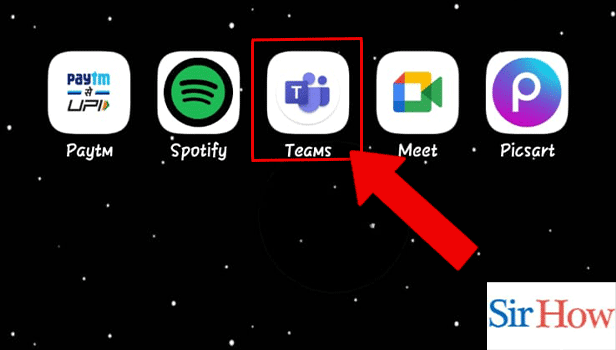
Step 1: Long press the Teams icon: Firstly, locate the Microsoft Teams application on your mobile.
- Click on the app and hold it.
- After long press, different options will pop up over your screen.
- Prefer the below image as a reference.
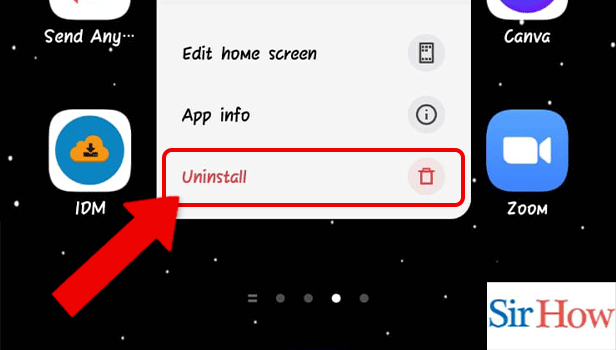
Step 2: Tap or Hold: Secondly, you have to tap or hold the application for a few seconds. Make sure you do it.
- Options will come over to you after you tap or hold the application.
- The options are to Edit home screen, App info and Uninstall.
- See the below image.
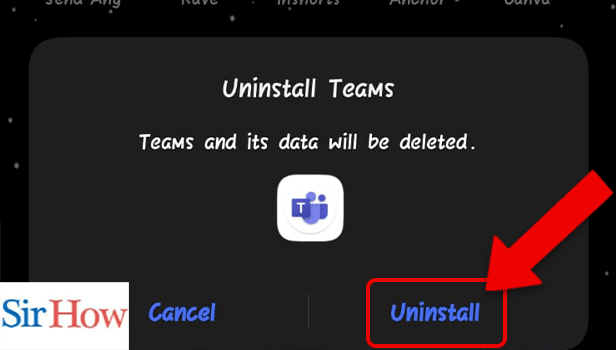
Step 3: Tap on Uninstall: Lastly, click on Uninstall to delete the app permanently from your device.
- Tap on Uninstall.
- Uninstall option will help you to delete the application.
- Uninstall option is shown by a red arrow in the given image below.
In the above portion, a detailed information is given for the people who wants to know how to uninstall Microsoft Teams. There are three easy steps that you have to follow to remove the app permanently. However, the steps mentioned are easy to follow, and a newcomer can understand them.
FAQs
Why does Teams reappear on my computer so frequently?
Microsoft Teams may be set up to run in the background, to start automatically, or it may not have been completely uninstalled if it keeps reinstalling itself.
The Microsoft Teams background process needs to be stopped. How can I do that?
Stopping Microsoft Teams from starting up automatically on your computer is the simplest approach to stop it from running in the background. Select Startup in the left-pane on the following page after going to Settings then Apps. Secondly,move the toggle next to Microsoft Teams to the "OFF" position in the right-pane. Disable reactions in Microsoft Teams if you don't want to see the reactions.
What happens to deleted Teams messages?
An end-user has no method to recover a deleted message in a private conversation because it doesn't go into the Recycle Bin. By doing an eDiscovery search, an administrator can retrieve it from the Compliance centre. Lastly, disable contacts from sync in Microsoft Teams if you don't want to store your contacts.
Team admins have access to private chats?
Yes. Your private discussions on Microsoft teams are easily accessible to Global Administrators and other individuals with the Administrator role. The administrators have access to everything you are doing while you are chatting on the project or server of the company. Access Microsoft Teams chats files if you want to read it.
Can Microsoft Teams monitor your behaviour?
You can look at trends over the previous 7, 30, 90, or 180 days in the Teams user activity report.
Thus, second portion tells you five important FAQs regarding this article. However, process mentioned in portion 1 is easy to follow and it will help you to uninstall Microsoft Teams. For any queries, ask it in the comment section.
Related Article
- How to Get the Chat box on Microsoft Teams
- How to See Multiple Participants on Microsoft Teams
- How to Open Camera on Microsoft Teams
- How to Prevent Microsoft Teams from showing away
- How to Block Someone on Microsoft Teams
- How to Add Calendar to Microsoft Teams
- How to Change Name in Microsoft Teams
- How to Create Organization in Microsoft Teams
- How to Get Full Screen in Microsoft Teams
- How to Know if Microsoft Teams is recording
- More Articles...
